🔥 ۴۰ درصد تخفیف ثبت‌نام دوره‌ها قبل از افزایش قیمت‌ها
۰ ثانیه
۰ دقیقه
۰ ساعت
۵ نوبر سلامت
ایجاد فاصله به ته اسکرول بالای Bottom navigation
جامعه فلاتر ایجاد شده در ۰۴ دی ۱۴۰۰

سلام

من وقتی به Positioned.fill مربوط به IndexedStack اندازه بیشتری میدم (مثلا 110) تا در ته اسکرول فاصله بیشتری داشته باشم ، همچین اتفاقی نمیفته و اون فاصله ای که میدم میاد بالای bottom navigation .چطوری میتونم در ته اسکرول فاصله داشته باشم؟
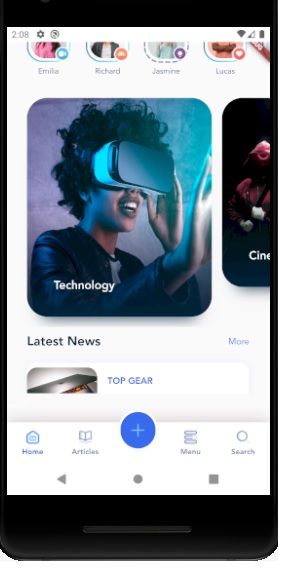

f3a9-bottom_navigation.jpg

سلام علی عزیز، وقت بخیر. کدهایی که استفاده کردین رو بفرستین تا بررسی کنیم.

دکتر مهران محمدی ۰۵ دی ۱۴۰۰، ۰۵:۳۰
const double bottomNavigationHeight = 65;
class _MainScreenState extends State {
  final List history = [];
  int selectedScreenIndex = homeIndex;
  late final map = {
    homeIndex: _homeKey,
    articleIndex: _articleKey,
    searchIndex: _searchKey,
    menuIndex: _menuKeyKey
  };
  final GlobalKey _homeKey = GlobalKey();
  final GlobalKey _articleKey = GlobalKey();
  final GlobalKey _searchKey = GlobalKey();
  final GlobalKey _menuKeyKey = GlobalKey();
  Future _onWillPop() async {
  final NavigatorState currentTabNavigatorState = map[selectedScreenIndex]!.currentState!;
    if(currentTabNavigatorState.canPop()){
      currentTabNavigatorState.pop();
      return false;
    }
    else if(history.isNotEmpty){
      setState(() {
      selectedScreenIndex = history.last;
      history.removeLast();
      });
      return false;
    }
    
    return true;
  }
  @override
  Widget build(BuildContext context) {
    return WillPopScope(
      onWillPop: _onWillPop,
      child: Scaffold(
        body: Stack(
          children: [
            Positioned.fill(
              bottom: 110,
              child: IndexedStack(
                index: selectedScreenIndex,
                children: [
                  Navigator(
                      key: _homeKey,
                      onGenerateRoute: (setting) => MaterialPageRoute(
                          builder: (context) => HomeScreen())),
                  Navigator(
                      key: _articleKey,
                      onGenerateRoute: (setting) => MaterialPageRoute(
                          builder: (context) => ArticleScreen())),
                  Navigator(
                      key: _searchKey,
                      onGenerateRoute: (setting) => MaterialPageRoute(
                          builder: (context) => SearchScreen())),
                  Navigator(
                      key: _menuKeyKey,
                      onGenerateRoute: (setting) => MaterialPageRoute(
                          builder: (context) => ProfileScreen())),
                ],
              ),
            ),
            Positioned(
              bottom: 0,
              left: 0,
              right: 0,
              child: _BottomNavigation(
                selectedIndex: selectedScreenIndex,
                onTap: (index) {
                  setState(() {
                    history.remove(selectedScreenIndex);
                    history.add(selectedScreenIndex);
                    selectedScreenIndex = index;
                  });
                },
              ),
            ),
          ],
        ),
      ),
    );
  }
}
class _BottomNavigation extends StatelessWidget {
  final int selectedIndex;
  final Function(int selectedIndex) onTap;
  const _BottomNavigation(
      {Key? key, required this.onTap, required this.selectedIndex})
      : super(key: key);
  @override
  Widget build(BuildContext context) {
    return SizedBox(
      height: 85,
      child: Stack(
        children: [
          Positioned(
            left: 0,
            right: 0,
            bottom: 0,
            child: Container(
              height: bottomNavigationHeight,
              decoration: BoxDecoration(color: Colors.white, boxShadow: [
                BoxShadow(
                    blurRadius: 20, color: Color(0xff9B8487).withOpacity(0.5))
              ]),
              child: Row(
                mainAxisAlignment: MainAxisAlignment.spaceEvenly,
                children: [
                  _BottomNavigationItem(
                    isActive: selectedIndex == homeIndex,
                    iconFileName: 'Home.png',
                    activeIconFileName: 'Home.png',
                    titleItem: 'Home',
                    ontap: () {
                      onTap(homeIndex);
                    },
                  ),
                  _BottomNavigationItem(
                    isActive: selectedIndex == articleIndex,
                    iconFileName: 'Articles.png',
                    activeIconFileName: 'Articles.png',
                    titleItem: 'Articles',
                    ontap: () {
                      onTap(articleIndex);
                    },
                  ),
                  Expanded(child: Container()),
                  _BottomNavigationItem(
                    isActive: selectedIndex == menuIndex,
                    iconFileName: 'Menu.png',
                    activeIconFileName: 'Menu.png',
                    titleItem: 'Menu',
                    ontap: () {
                      onTap(menuIndex);
                    },
                  ),
                  _BottomNavigationItem(
                    isActive: selectedIndex == searchIndex,
                    iconFileName: 'Search.png',
                    activeIconFileName: 'Search.png',
                    titleItem: 'Search',
                    ontap: () {
                      onTap(searchIndex);
                    },
                  )
                ],
              ),
            ),
          ),
          Center(
              child: Container(
            width: 65,
            height: 85,
            alignment: Alignment.topCenter,
            child: Container(
                height: 65,
                decoration: BoxDecoration(
                    border: Border.all(color: Colors.white, width: 4),
                    borderRadius: BorderRadius.circular(32.5),
                    color: Color(0xff376AED)),
                child: Image.asset(
                  'assets/img/icons/plus.png',
                )),
          )),
        ],
      ),
    );
  }
}
نوبر سلامت ۰۵ دی ۱۴۰۰، ۱۰:۰۱

سلام باید یه SizedBox انتهای لیستت اضافه کنی و اون فاصله ۱۱۰ که گذاشتی رو حذف کن و به SizedBox بده

دکتر مهران محمدی ۰۵ دی ۱۴۰۰، ۱۰:۴۲

یعنی میگین به تمام صفحات این SizedBox رو اضافه کنم؟

نوبر سلامت ۰۵ دی ۱۴۰۰، ۱۷:۵۳

110 رو 65 بدید حل میشه استاد در جلسه مربوط توضیح دادن

مهرسا عنایت ۰۶ دی ۱۴۰۰، ۰۵:۱۱